Diferencia entre revisiones de «Incarnatia»
De AbandonWiki
Ir a la navegaciónIr a la búsquedam (Texto reemplazado: «http://macintoshgarden.org» por «https://macintoshgarden.org») |
m (Texto reemplazado: «* 16px|TheLegacy [http://www.thelegacy.de/Museum/» por «* 16px|TheLegacy [https://web.archive.org/web/20160603013220/http://www.thelegacy.de/Museum/») |
||
| Línea 66: | Línea 66: | ||
==Enlaces de interés== | ==Enlaces de interés== | ||
| − | * [[Archivo:TheLegacy.ico.png|16px|TheLegacy]] [http://www.thelegacy.de/Museum/22001 TheLegacy] | + | * [[Archivo:TheLegacy.ico.png|16px|TheLegacy]] [https://web.archive.org/web/20160603013220/http://www.thelegacy.de/Museum/22001 TheLegacy] |
* [[Archivo:Adventure_Legends.ico.png|16px|Adventure Legends]] [https://www.legendsworld.net/adventure/game/8208 Adventure Legends] | * [[Archivo:Adventure_Legends.ico.png|16px|Adventure Legends]] [https://www.legendsworld.net/adventure/game/8208 Adventure Legends] | ||
* [[Archivo:Macintosh_Garden.ico.png|16px|Macintosh Garden]] [https://macintoshgarden.org/games/incarnatia Macintosh Garden] | * [[Archivo:Macintosh_Garden.ico.png|16px|Macintosh Garden]] [https://macintoshgarden.org/games/incarnatia Macintosh Garden] | ||
{{Juegos}} | {{Juegos}} | ||
Revisión del 18:07 22 dic 2024


Descripción
Personajes
Curiosidades
Instalación
Windows XP
- Se instala desde el segundo CD. Debido a que todo está en japonés, hay que instalar a base de prueba y error, pero es posible instalar. Luego se monta el primer CD y se lanza desde C:\incarnatia\incarnatia_Win.exe.
- Poner compatibilidad con Windows 95 a installer.exe del CD2 y al lanzador incarnatia_Win.exe de la instalación.--cireja 19:20 23 sep 2013
Imágenes

Incarnatia
Incarnatia
Incarnatia

Incarnatia

Incarnatia
Incarnatia
Incarnatia
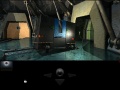
Incarnatia

Incarnatia

Incarnatia

Incarnatia

Incarnatia


Extras

Trasera


